
From new email to sent reply, in seven steps.
No new address. No new habits for your customers. Patti fits into the email you already have — and you stay in charge of every word that goes out.
Connect your existing email
Gmail, Microsoft 365, or any standard email provider. Nothing changes about your address — customers keep writing to the same place they always have.
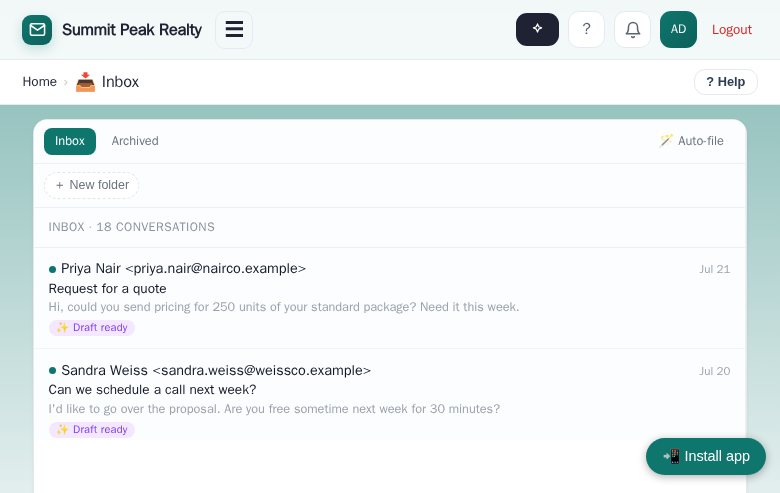
Patti reads every incoming email
She filters out the junk, then figures out what each message actually needs. Is this someone trying to schedule a meeting? A pricing question? A support issue? Or just a “thanks, got it”? She treats each one differently — the way a good assistant would.
She drafts a reply that answers the actual question
Patti writes from the full history of the conversation, your business information, and your real prices — never invented. If something’s missing from the customer’s message, she notices and asks about it.
You approve, edit, or reject — from anywhere
A notification arrives on your phone (Telegram or text message) or in the web dashboard. Reply “yes” to send, type a change, or just speak your edits out loud — Patti updates the draft. Over time she learns your tone from the edits you make.
Approved replies send from your email, in the same thread
To your customer it looks exactly like you wrote back — because you did approve it. Meetings go straight onto your Google Calendar with a Meet link. Repeat contacts are remembered automatically.
The email also goes to the right department
Approving the reply isn’t the end of it. If it’s an order, it lands in the order department at the same time. A complaint goes to the complaint department. A quote request reaches the people who price it. Whatever kind of email it is, it gets to where your business handles it — automatically, with nothing forwarded by hand.
Nobody falls through the cracks
If a customer goes quiet after you replied, the daily follow-up digest reminds you. The lead that used to get buried on page three of your inbox now taps you on the shoulder.
One email, everywhere it needs to go.
Approving the reply is only half of what happens. When an email comes in, Patti also sends it where your business needs it — at the same time, automatically.
- Your salesperson is out in the field and a contractor emails in an order. She approves the reply from her phone — and the order department already has it.
- A shipment went to the wrong location. She approves the response to the customer — and the complaint department is already on it.
- A quote request doesn’t just get answered — it’s forwarded to the department that prices it.
You set the rules once, in plain English. From then on, every email lands with the right people — not buried in one person’s inbox.
Your own office assistant, on call.
Patti isn’t only in your inbox — she’s an office assistant you can simply talk to, by text or voice. Ask “what’s on my calendar today?” or say “draft an email to the Hendersons about their closing date” and it’s done.
- Ask about your calendar, contacts, or recent email
- Dictate new emails and notes on the go
- Works by text or voice — whichever is in reach
The easiest way to understand it is to watch it happen.
In a live demo, Patti reads a real email and drafts the reply while you watch.